
In this episode of the IBM i Update, I’ll be:
- Exploring the question of ‘When someone leaves, what IBM i knowledge needs to stay?‘ with Dave Roberts from Tomorrow Platforms
- Demystifying IBM i cloud myths with Richard Field from Kyndryl
- Asking if AI is to blame for the dramatic rise in IBM i security alerts?
- And finally taking a quick look at my new IBM Champion-branded goodies
In early November, i-UG hosted its final event of the year at the Mount Country Manor Hotel in the beautiful Wolverhampton countryside.
Now, one of the things that i-UG is famous for is its warm welcome to delegates, and the Midlands event didn’t disappoint with the obligatory mountain of bacon butties and pastries available to all during registration.
The event itself was multi-streamed with a cracking choice of topics and speakers depending on your interest or skill area. But I really want to hone in on two of the key presentations and discuss these with you in more detail.
When a developer leaves, what IBM i knowledge needs to stay?
The first presentation was, ‘When someone leaves, what knowledge needs to stay?’ A topic that was hosted by Dave Roberts, Founder and Principal at Tomorrow Platforms.
Now I say, ‘hosted’, as this session wasn’t your usual presentation format, more of an ‘interactive workshop’ where gleaning the experience from each participant was as valuable as the learning objectives themselves.
And that in itself was quite pertinent as the conversation revolved around knowledge retention.
You see, Experienced IBM i professionals often carry decades of knowledge about business processes, application dependencies and the decisions behind their systems. When they leave, organisations risk losing far more than technical expertise.
- Business Processes – Why applications behave the way they do.
- Critical workarounds – The workarounds that keep critical processes running.
- Design decisions – The reasoning behind historical design decisions.
- Human judgement – The judgement needed when something unexpected happens.
So, how to ensure that when an experienced colleague leaves, the knowledge they have of the systems they’ve been building and managing… remains within the business.
Well, first, Dave’s central argument is that retaining system documentation isn’t necessarily the same as retaining the knowledge needed to operate, maintain and develop that system.
Explicit vs tacit knowledge: what’s the difference?
Dave introduced an important distinction between two forms of knowledge: explicit and tacit.
Explicit knowledge is what we can document. It includes our source code, technical manuals, procedures and application architecture.
Tacit knowledge is different. It’s the understanding someone builds through years of experience.
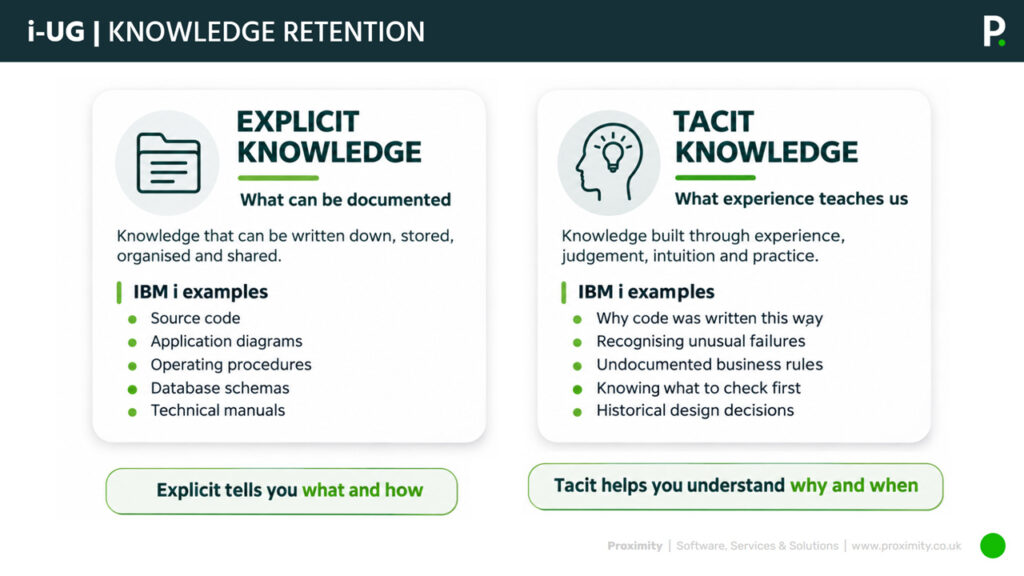
It’s knowing why something was designed a particular way, recognising when something isn’t quite right, or remembering that obscure business rule nobody ever documented.
And therein lies the challenge. You might have every line of RPG source code, but that doesn’t necessarily mean you understand why it was written that way.
So, documentation alone isn’t enough…
Yes, you have to capture what matters. And this involves documenting critical processes, application dependencies, exceptions and the reasoning behind important decisions.
But you also have to transfer experience. Use mentoring, workshops, structured interviews, shadowing and practical exercises to pass on judgement as well as information.
Using AI for capturing IBM i knowledge
And then Dave added that today, you should explore the role of AI.
No, not for actual knowledge creation, but AI could help organise, retrieve and connect accumulated knowledge.
However, it cannot be assumed to replicate years of experience and human judgement.
The goal isn’t simply to preserve information. It’s to ensure the next generation can understand, maintain and confidently develop the systems they inherit.
Now, post-event, I took time to meet with Dave to discuss this fascinating topic in more detail.
What can you do to ensure valuable IBM i knowledge isn’t lost?
I started by asking him how significant a risk for IBM i organisations is the reliance on key experienced individuals and what can be done to ensure that vital knowledge isn’t lost should they leave?
Dave Roberts, “Well, Andy, I think the risk is very significant. According to Fortra’s 2026 IBM i Marketplace Survey, 69% of respondents identified IBM i skills among their top five concerns, making it the highest-ranking issue, even ahead of cybersecurity.
The first step for organisations is to identify where the business relies heavily on one individual’s experience and judgement. It’s important to capture those unusual situations as they occur. What did that person notice? Why did they respond in a particular way? And what made them take a different approach from the standard procedure?
It’s also essential to give experienced colleagues the time and encouragement to share their knowledge, while providing less experienced team members with a safe environment in which to learn.
That means allowing them to take the lead, make decisions and even make mistakes, knowing that an experienced colleague is there to guide and support them.
Ultimately, that’s how organisations can begin to transfer the tacit knowledge that might otherwise be lost when an experienced member of the team leaves.”
In the full interview with Dave, we deep-dived into the difference between tacit and explicit knowledge, discuss the skills gap, the role of AI and testing knowledge transfer.
Catch the full conversation:
IBM i Knowledge Transfer: Why Tacit Knowledge Matters When Key Developers Leave
IBM i Cloud Myths Demystified
Cloud computing has become almost synonymous with IT modernisation. But for organisations running business-critical applications on IBM i, is moving to the cloud always the right decision?
At the recent i-UG Midlands conference, Richard Field of Kyndryl presented Cloud Myths Demystified, a session designed to challenge some of the assumptions surrounding cloud adoption.
Rather than promoting a particular platform, Richard set out to explore the advantages, disadvantages and practical realities of moving IBM i workloads to the cloud.
For some organisations, the attraction is avoiding costly hardware refreshes, reducing infrastructure responsibilities and improving business resilience. For others, concerns remain over cost, complexity, security and the potential disruption to established applications.
But perhaps the biggest misconception is that moving to the cloud automatically means modernising your applications.
The reality is that migration and modernisation are two very different things.
Is cloud cheaper than on-premises?
One of the most persistent cloud myths is that migration will inevitably reduce IT expenditure.
But is cloud genuinely cheaper? The answer depends on considerably more than the monthly infrastructure bill.
On-premises IBM Power environments require investment in hardware, maintenance, facilities, power, support and periodic technology refreshes.
Cloud solutions can reduce some of those responsibilities, replacing capital expenditure with ongoing operational costs and providing greater flexibility in how resources are consumed.
However, cloud introduces its own considerations, including consumption charges, software licensing, connectivity, data transfer, backup and disaster recovery.
For organisations with predictable workloads and well-managed existing infrastructure, an on-premises solution may remain financially attractive.
What are the pros and cons of moving IBM i to the cloud?
The more interesting question might therefore be whether cloud should be evaluated purely on cost savings, or on the wider business value it can deliver.
That of flexibility, resilience, scalability and reduced infrastructure responsibility may prove more valuable than simply achieving the lowest hosting cost.
For many IBM i organisations, the longer-term objective isn’t simply moving their applications. It’s making those applications more accessible, adaptable and better integrated with the wider business.
This might involve introducing APIs, improving access to business data, modernising user interfaces or connecting existing applications with new digital services.
Cloud infrastructure can provide opportunities to accelerate these initiatives, particularly where organisations want to integrate with cloud-native analytics, automation and AI services.
However, migrating to the cloud is not a prerequisite for application modernisation. Many of these improvements can also be achieved while IBM i remains on-premises.
And although cloud platforms can simplify access to AI services, they don’t automatically make decades-old applications or the information they contain ready for artificial intelligence.
That requires an understanding of the applications, their data, their dependencies and the business processes they support.
Ultimately, the question shouldn’t simply be whether an organisation should move its IBM i environment to the cloud.
It should be about understanding what the business wants to achieve, evaluating the available options and determining where cloud genuinely adds value.
Cloud migration should support the modernisation strategy, not become the strategy itself.
Does moving to cloud count as modernisation for IBM i?
Now, this presentation was made by Richard Field of Kyndryl, and after the event, I caught up with him and started my conversation by asking, ‘If I moved my IBM i applications into the cloud without changing a single line of code, have I actually modernised anything, or have I simply changed where my system lives?”
Richard replied, “A traditional lift and shift into the cloud is a perfectly valid approach, particularly for organisations looking to exit their data centres. However, it’s often the first step in a much broader modernisation journey.”
“Over the years, customer workloads and business requirements have evolved. Organisations increasingly need the agility, flexibility and rapid deployment capabilities that cloud infrastructure can provide.”
“So, even without touching a single line of application code, you have, to some extent, modernised the way in which your infrastructure is delivered and consumed.”
“Application modernisation itself may come at a later stage, but moving to the cloud can be an important part of that wider modernisation roadmap.”
In the full interview with Richard, we further ‘demystify cloud myths’.
Catch the full conversation:
Cloud vs On-Premises for IBM i Applications: What to Consider Before You Decide
Is AI to blame for the dramatic rise in IBM i security alerts?
So, something significant is happening in IBM i Security with a dramatic increase in security alerts from the previous year.
According to a recent IT Jungle investigation, IBM issued 77 IBM i security alerts throughout the entirety of 2025. In 2026, up until mid-November, IBM had issued 396 security alerts. That’s an increase of more than five times.
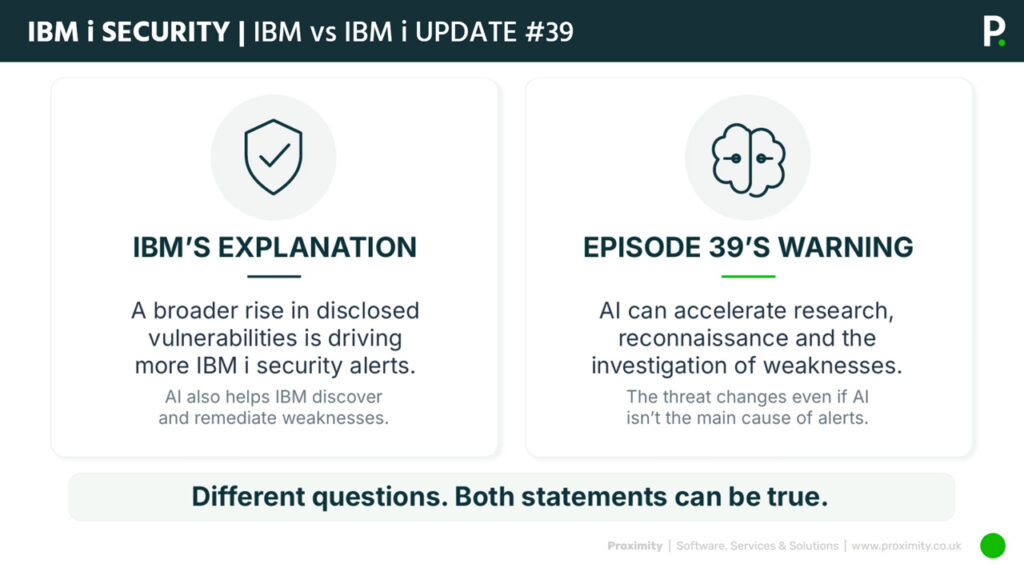
Now, why would this be? You’d think Artificial Intelligence, right? Well, IBM says that AI isn’t the primary reason. Instead, it attributes the rise largely to wider industry trends in vulnerability discovery.
IBM does acknowledge that AI-powered tools are uncovering weaknesses traditional methods may have missed, and they also recognise that AI is helping accelerate remediation.
It’s important to remember that these figures represent security alerts, not successful attacks or necessarily distinct vulnerabilities in the IBM i operating system itself.
Nevertheless, the volume of disclosures deserves attention.
Is it AI for exploiting vulnerabilities, or for finding and fixing them?
Now, back in Episode 39 of the IBM i Update, we explored how AI is changing the security landscape.
My argument there wasn’t that AI was responsible for an increase in IBM’s security bulletins. It was that AI can make identifying and investigating vulnerabilities faster, potentially reducing the specialist knowledge attackers previously needed.
And there’s supporting evidence from IBM itself.
Its 2026 X-Force Threat Intelligence Index reported a 44% increase in attacks beginning with exploitation of public-facing applications, highlighting missing authentication controls and AI-enabled vulnerability discovery. That’s an industry-wide finding, not an IBM i-specific statistic.
And if you missed that episode, you can catch it right here:
Security in the AI era, plus Fortra’s IBM i Marketplace Survey 2027
So both arguments can be true. AI needn’t be the principal cause of more IBM i security alerts to represent a growing challenge for organisations running the platform.
One of our central messages in Episode 39 was that IBM i’s excellent security capabilities are only effective when properly configured, maintained and monitored.
Over-privileged user profiles, excessive special authorities, shared accounts, unreviewed audit journals and weak controls around external access can all introduce unnecessary risk.
Limited visibility into the Integrated File System, inadequate security reporting and the absence of real-time alerting can make identifying suspicious activity harder still.
These aren’t necessarily new vulnerabilities introduced by AI. They’re established security management challenges.
But when attackers can use increasingly sophisticated tools to investigate systems, relying on complexity, familiarity or the platform’s historical reputation for security becomes a less convincing defence.
How can IBM i users protect themselves?
For organisations running business-critical applications on IBM i, the response should be practical rather than alarmist. Start by understanding your exposure. Review new security bulletins, assess the relevance of CVEs and prioritise appropriate PTFs.
Then examine and monitor user authorities, connections, interfaces and permissions. Crucially, make security an ongoing operational responsibility rather than an occasional exercise.
Remember, IBM i remains a highly capable, secure platform. But its security isn’t automatic.
So, the most important question isn’t whether AI caused the increase in security alerts. It’s whether we’re actively managing the risks those alerts help expose.
IBM Champion-branded goodies
And finally, I’ve recently received some IBM Champion-branded goodies, a really nice gesture from IBM and a welcome reminder of what it means to be part of this fantastic community.
Now, I know you’re interested, so let’s have a look at what was included within the pack:

As I approach the end of my first year as an IBM Champion, it’s been a real privilege to be involved with a community of people who share such enthusiasm for IBM technology.
Through the IBM i Update, I’ve had the opportunity to speak with some fascinating people, share their knowledge and experiences, and hopefully contribute something useful to the wider IBM i community.
The goodies are very much appreciated, IBM. Thank you!
And that’s it for episode 41 of the IBM i Update.
I’m Andrew Nicholson, and we’re Proximity, your application support, maintenance and development partners who are in your corner.
If you missed it, you can check out my previous update here, or access all the IBM i Updates in one place.
Alternatively, if you’d like to receive the latest IBM i Update hot off the press to your inbox, subscribe to the IBM i Update on LinkedIn.